
Is your computer running slow? Are you frustrated with working with your slow computer? Then, just spend a few minutes to fix it. Nowadays, many of us are regularly using a computer. It is due to the pandemic. You might use a computer for remote working, or online classes. So, it is mandatory to check the speed of your computer. There are several reasons behind the question ‘Why is my computer so slow?’. It might be due to software issues, hardware problems, or simply the way you use it.
So, here are some answers to ‘How to fix a slow computer?’.
Many apps automatically open when the computer starts
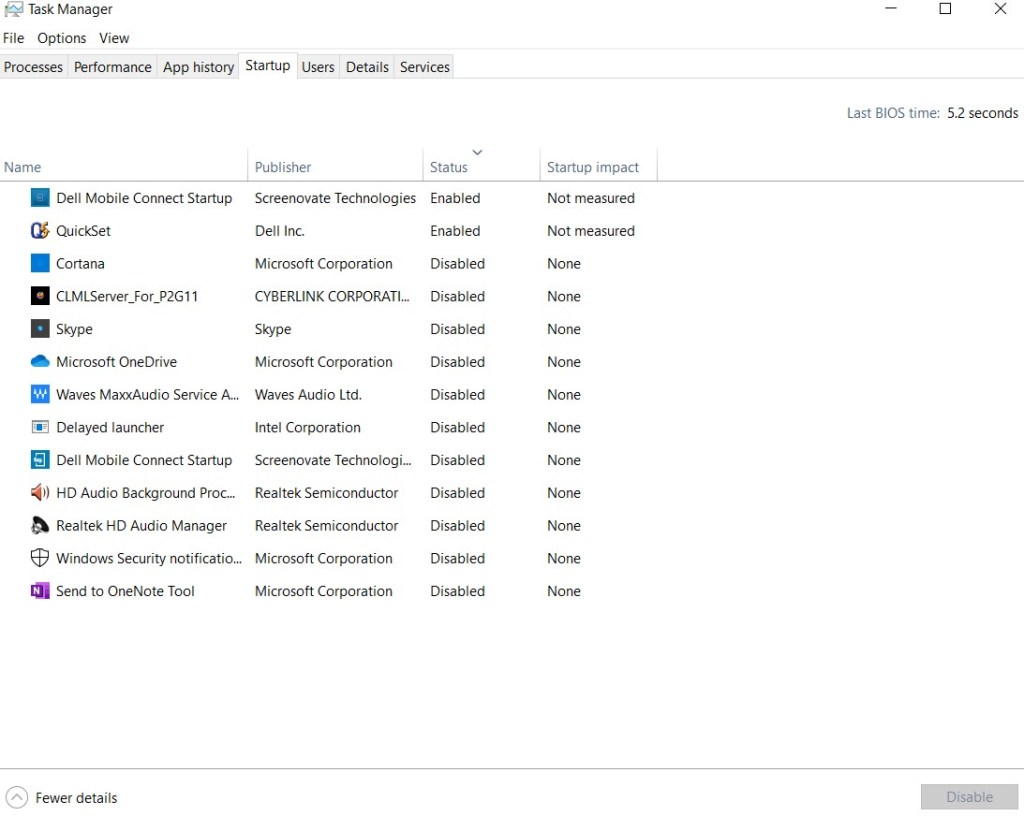
You switch on the PC and it takes time to boot up. If this is the case, then many apps are running in the background. The boot time varies according to the age of the computer whether it is old or new.
Solution: Task Manager is the best option to solve the above problem. If you are using Windows 8 or Windows 10 press ‘windows+x’ and then choose task manager. In the task manager window, right-click on the programs that need to be closed. Now, click ‘Disable’. In this manner, you can have control over the number of apps to start automatically each time you switch on the computer.
Hard Drive/ Storage is almost full
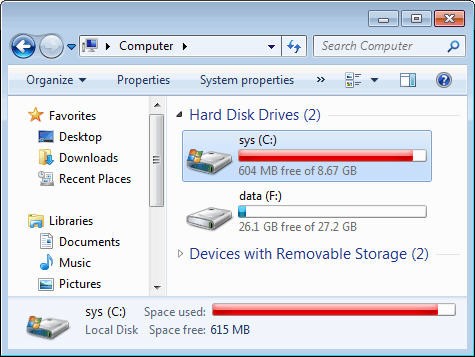
Check your hard drive’s health. The computer’s processing speed can reduce if the hard drive is close to 85% full. So, always make sure that you have a certain amount of free hard drive space. Above all, make sure not to use a graphics-heavy program on an entry or mid-level configuration.
Solution: Delete all the unnecessary downloaded files. Also, make sure to have clean trash. Then, move all large files to the Cloud, this could save a large amount of space. You can also upgrade your RAM to increase the processing speed of the computer.
Check for Virus\Malware

If your computer’s hard drive is perfect and there are no other major issues, then check for any presence of viruses or malware. These viruses, spyware, or malware may slow down the computer. They might be running down in the background. Besides, these viruses may also steal important confidential data, usernames, and passwords.
Solution: Make sure to use antivirus software. Also, update the software regularly as hackers are always a step ahead. Another important point to make sure is that you don’t use an overzealous antivirus program.
Many Browser Tabs are open

Always check the number of tabs opened in your browser. Also, make sure to use only a single browser. When you keep many tabs open it impacts the computer’s memory and the processing speed. Further, auto-refresh websites, like live streams, or live blogs continue to download advertisements and eat up the computer’s speed.
Solution: Make sure to close all the inactive tabs in your browser and don’t overload your browser. If you want to save a tab then bookmark it for future reading. Finally, don’t use many browsers like Microsoft Edge, Chrome, or Firefox at the same time.
Restart your Computer

Sometimes a simple restart may solve many of the technical issues and thereby boost the computer’s speed. Many programs are running in the background that is not ended properly. These programs use a large number of resources and thus slow down the system.
Solution: Restart your system regularly and always make sure to run restart after every new software download or software update.
You must always maintain your computer’s hardware and the software to have a seamless functioning of the system. Also, follow the above steps to change your slow and lethargic computers and make them more efficient.




 Digiteks
Leave a comment