
Few interesting facts about the latest Windows 10 20H2 update.
Windows 10 20H2 is one of the major updates from Microsoft. Here the 20H2 represents that the update will be released in the second half of the year 2020. This new update released on October 20, 2020. This update mainly focuses on fixing the bugs from the last update. In addition to that, you can also find a few major changes to Windows 10.
Two major changes in the Windows 10 20H2 update
- Chromium-based Microsoft Edge Browser
- A new start menu theme
New Chromium Edge
Earlier by default Windows 10 used the non-chromium version of Microsoft Edge. You have to download the new version of Edge separately. Now the new chromium-based Microsoft edge browser is integrated within and it is your default browser.
Start menu’s theme
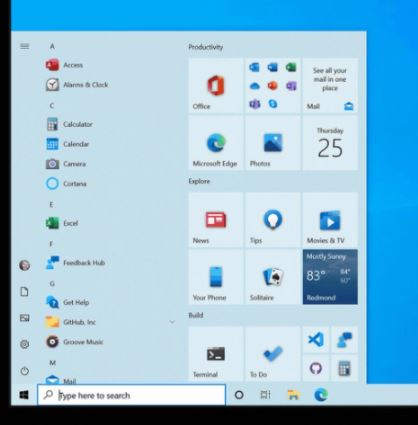
Previously, you can spot blue icons on the darker blue shade background. Now, Microsoft has shifted to using standard theme colors instead of using accent colors. So, you can experience a better-looking start menu. Partial transparent background is added to the app tiles in the start menu. The new theme fits perfectly for both light and dark themes.
Who can get the Windows 10 20H2 version?
All users running Windows 10 versions 1903 and higher can manually update to the 20H2 version. It is completely free and this is an optional update from Windows. However, it is best to update so that your device has the latest security patches.
How to get the new update?
First, go to Settings > Update & Security > Windows Update. Then, you must click ‘Check for Updates’. If the update is available then you can click the ‘Download and Install’ icon.
You can expect the next Windows 10’s 21H1 update around spring 2021.




 Digiteks
Leave a comment