Easy steps to combine PDF files on Android, Windows, Mac, and iOS.
With the pandemic around most of the people are working and studying from home. The way of working and learning is becoming more digitized. Office goers are using more official documents and settlements in PDF format. Again, school children are submitting their worksheets in PDF format. Apart from this, there are many other places where people are using PDF formats. So, we come across issues like how to edit the PDF and how to combine the PDF files. We have already seen the best PDF editors. Here you can see different methods on how to merge PDF files or combine PDF files into a single file.
How to combine PDF files on Android?
Want to merge your PDF files from your phone? Yes, it is also possible. With so many apps in Google Play, we have picked one app with a rating of 4.4. Download PDF Merge.
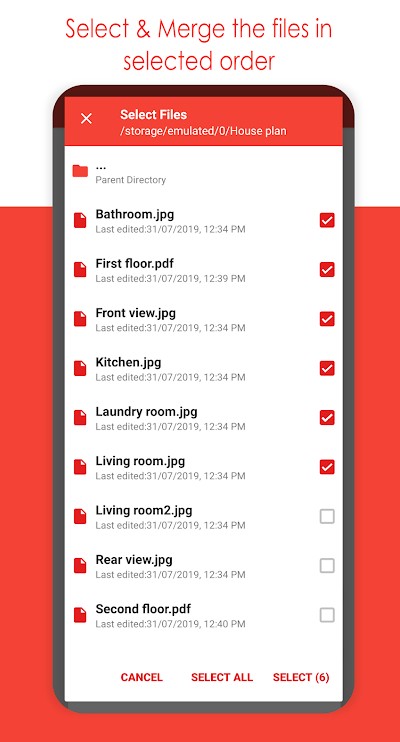
This app allows you to combine PDF files, merge images to PDF, rearrange the PDF while merging, compress and encrypt the PDF document with a password.
How to combine PDF files on Windows?
In Windows OS, you can use the Adobe Acrobat Reader DC to merge PDF files to one.
- First, download Adobe Acrobat Pro DC free trial. Then, install the software.
- Post successful installation, open the application. Then, go to the ‘Tools’ tab that is present on the top bar.
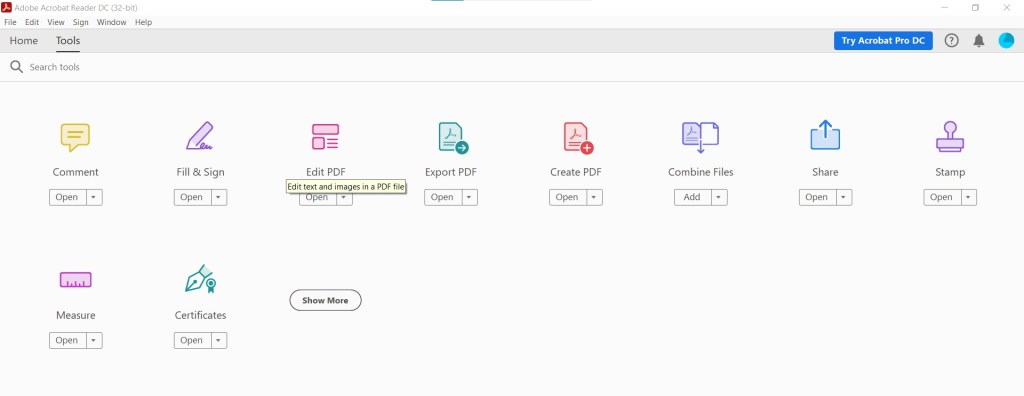
- Now, choose the ‘Add’ option in Combine Files. Then select all the PDFs that must be combined and click Combine Files.
- You have combined multiple PDFs into one. Provide a name and select the location for the newly created PDF.
Normally, Windows users can download any of the free version software available to combine or edit PDFs.
How to combine PDF files on Mac?
Combining PDF files on Mac is very easy with the built-in intuitive software, Preview.
- First, open Preview. Then open the PDF file that is to be merged.
- Go to View and then click thumbnails. This shows page thumbnails on the sidebar.
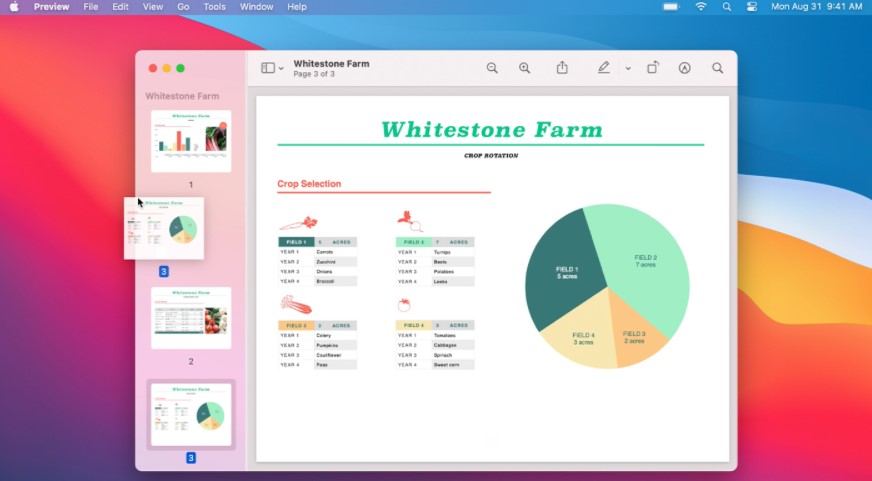
- Now you can just simply drag another document and drop it in the Preview sidebar. In this manner, you can easily combine the PDFs.
- Further, you can also reorder the PDFs.
How to merge PDF files on iOS?
Merging PDF files on your iOS device is very easy. It can be completed in just a few clicks.
First, open the Files app, then select the files that you want to merge. Then, click the three-dots icon in the bottom-right. Now click create PDF.
Apart from all these methods, you can join PDF files online. Many free websites allow you to combine PDF files. They do not have any restrictions on the source of the files. But sometimes few websites can have some limits on the size of the PDF files. Other problems might include formatting issues. Few examples of these websites are, Sejda merge PDF, Foxit merge PDF, IlovePDF merge, PDF Joiner online.
The advantage of these websites is that you can combine the PDF files irrespective of any OS that you are using.




 Digiteks
Leave a comment